A lightweight alternative to BaoTa Panel and 1Panel. WP Panel is built for WordPress — a single binary written in Go (about 20MB, typically using 20-50MB of memory). Site building, FastCGI caching, file locking, backups, and monitoring are all built in. It ships with a production-ready secure configuration by default, and runs smoothly even on a 1C1G VPS.
A graphical management backend that requires no command line — install it with one command, then create sites, enable SSL, and run backups all by clicking in the web interface.
Fully open source and auditable · Dual verification of update packages · Secure baseline by default · GPL-3.0, free forever
Choose the installation route based on your server's network.
apt-get update && apt-get install -y wget ca-certificates && wget -qO- https://raw.githubusercontent.com/naibabiji/wp-panel/main/install.sh | bashSuitable for overseas servers and environments with normal access to GitHub
apt-get update && apt-get install -y wget ca-certificates && wget -qO- https://gh.wp-panel.org/https://raw.githubusercontent.com/naibabiji/wp-panel/main/install-cn.sh | bashSuitable for servers in mainland China, or servers that cannot access GitHub normally
Currently only Debian 13 (Trixie) is supported. If you encounter compatibility issues, reinstalling a clean system is recommended.
Not comfortable with the command line? View the illustrated installation guide →
Streamlined, efficient, secure. Only the features truly needed for WordPress operations.
One-click create WordPress or generic PHP sites, automatically configure PHP-FPM Pool, Nginx, SSL certificates. Supports suspend, delete, reinstall, with full automatic rollback.
Set core code and sensitive configuration to read-only with one click, keeping only uploads writable, with standard / strict modes. Prevents backdoors and tampering, and establishes an integrity baseline.
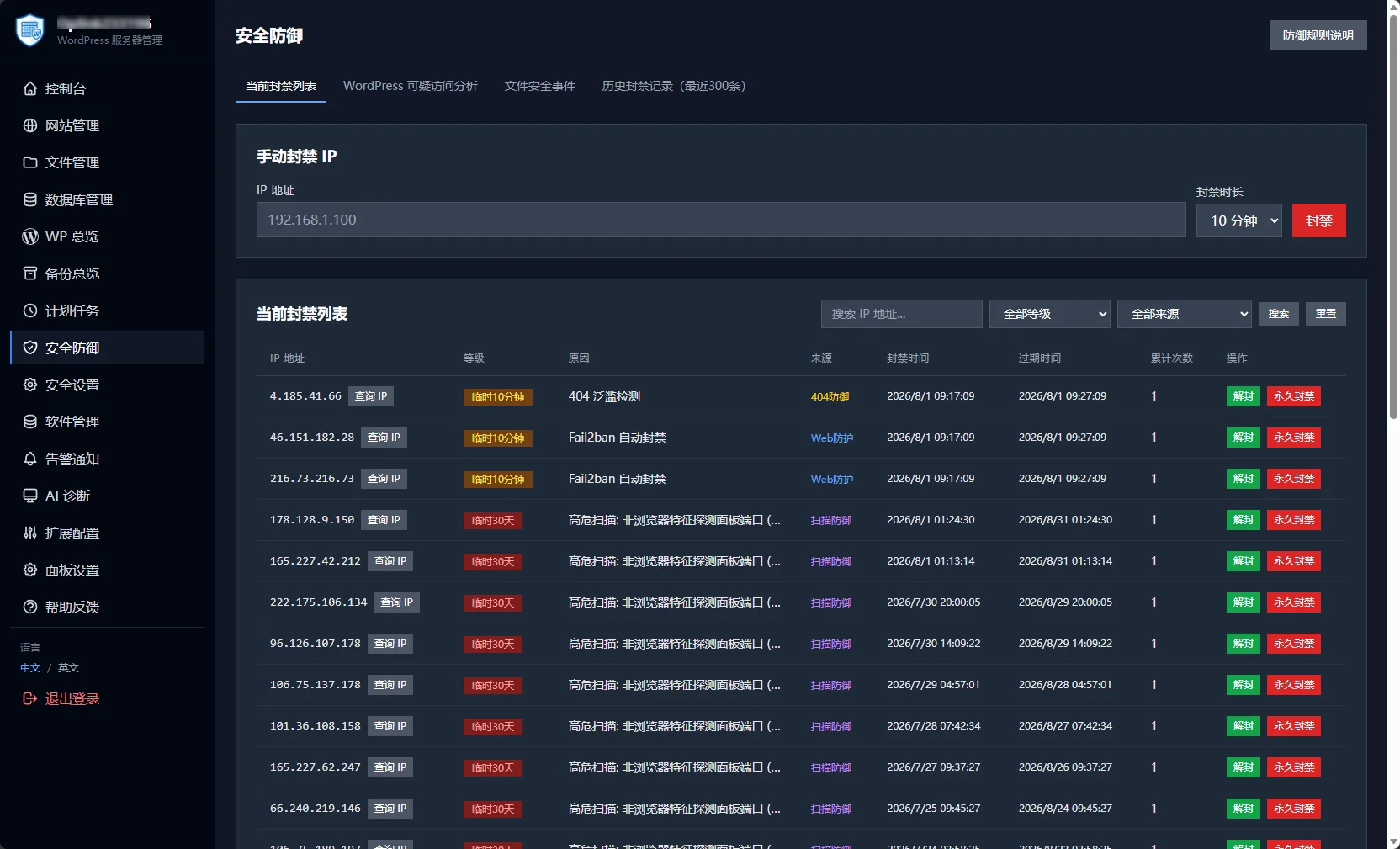
Multi-stage progressive banning, Fail2ban + Nftables integration, panel scan defense, and suspicious access analysis. Independent rate limiting for crawlers, with every block clearly traceable.
Nginx FastCGI Cache works out of the box. Enable it with one click and automatically skip logged-in users and shopping carts. A companion WordPress plugin clears the cache automatically, with freely adjustable TTL.
Hourly snapshots of site content, application passwords, and database objects. After establishing a baseline, abnormal changes trigger immediate alerts — know the moment your site is tampered with.
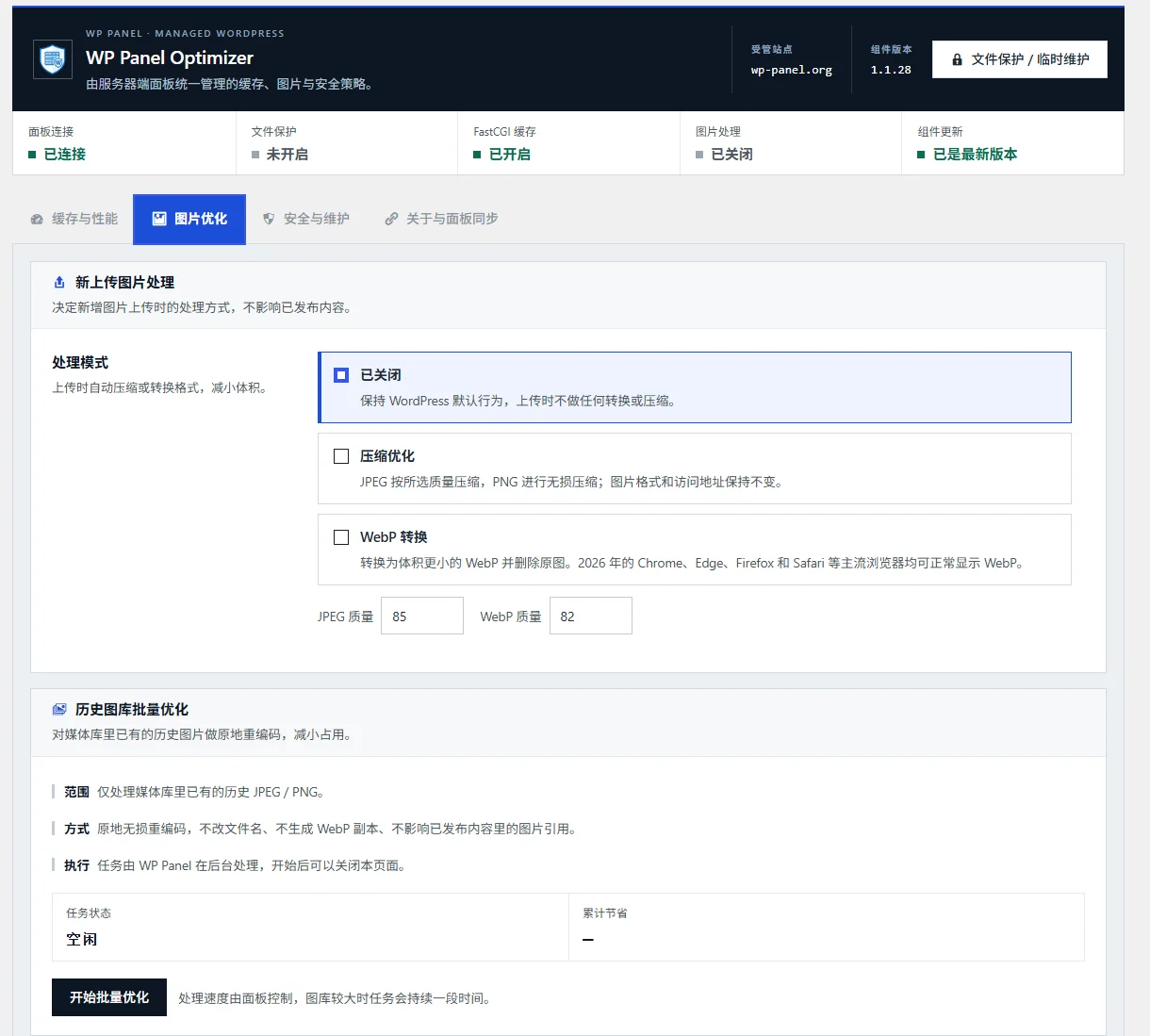
Newly uploaded images are automatically converted to WebP and compressed. The historical media library supports batch optimization. No extra plugins needed — speed up your pages directly.
Breadcrumb navigation, multi-select operations, compression/decompression, cross-directory cut and paste. Supports chunked upload and resumable transfer, with built-in Zip Slip security protection.
Supports backup, restore, upload restore, and automatic backup. Site backups can be archived off-site via SSH + rsync or S3 object storage, with local copies retained according to policy.
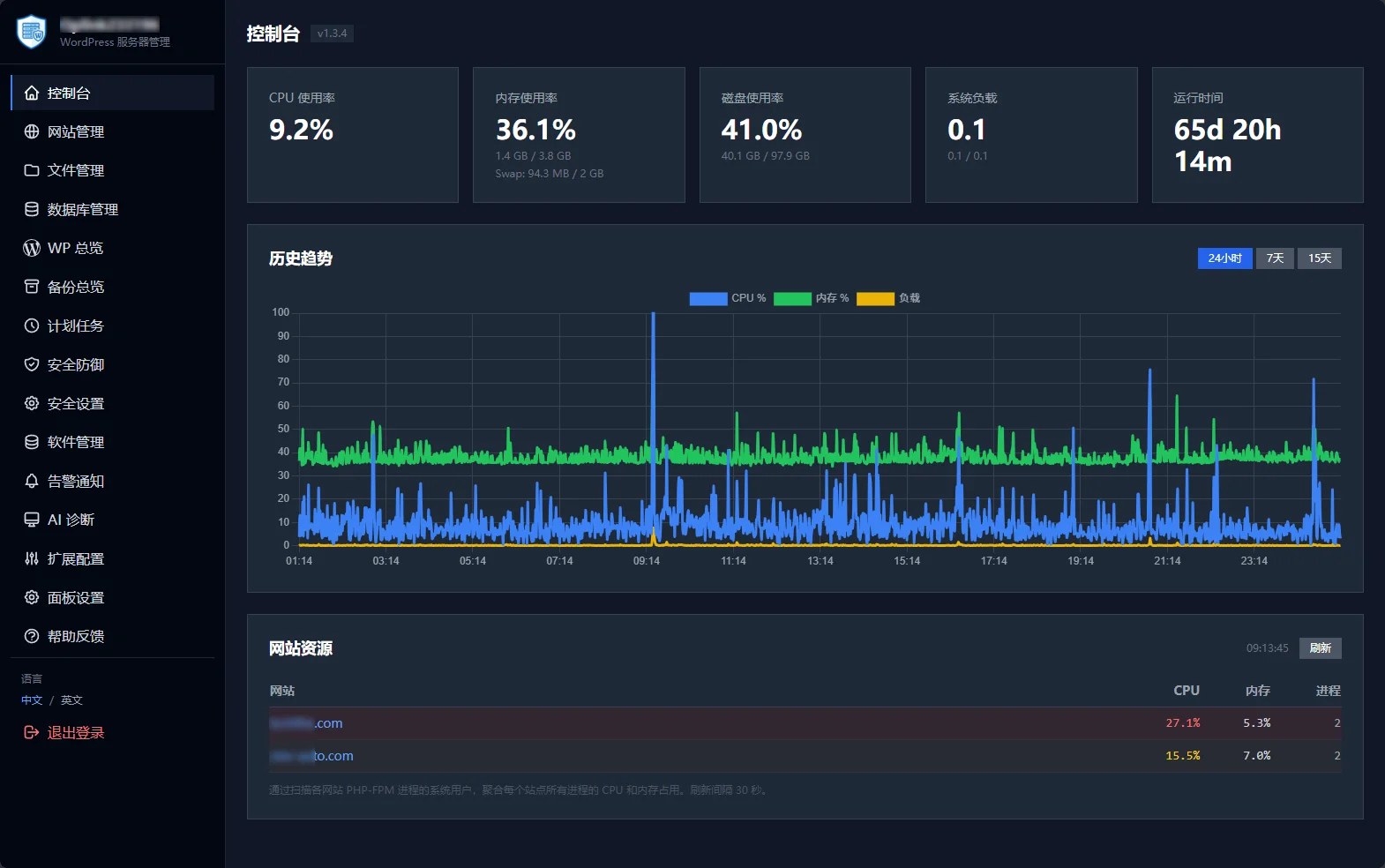
Real-time cards for CPU / memory / disk / load, with 24h/7d/15d historical trends. 1-minute collection interval, data automatically purged after 15 days.
Visually create scheduled tasks: custom commands, incremental file backups, WP Cron calls. Automatically written to the system crontab, with the last 300 lines of execution logs available for review.
The status of the Nginx / PHP / MariaDB / Redis stack is clear at a glance. systemd process supervision, visual configuration editing, and automatic syntax validation on save.
Automatically checks for system security patches and new panel versions. Panel updates undergo dual SHA256 + Ed25519 verification, with automatic rollback on failure.
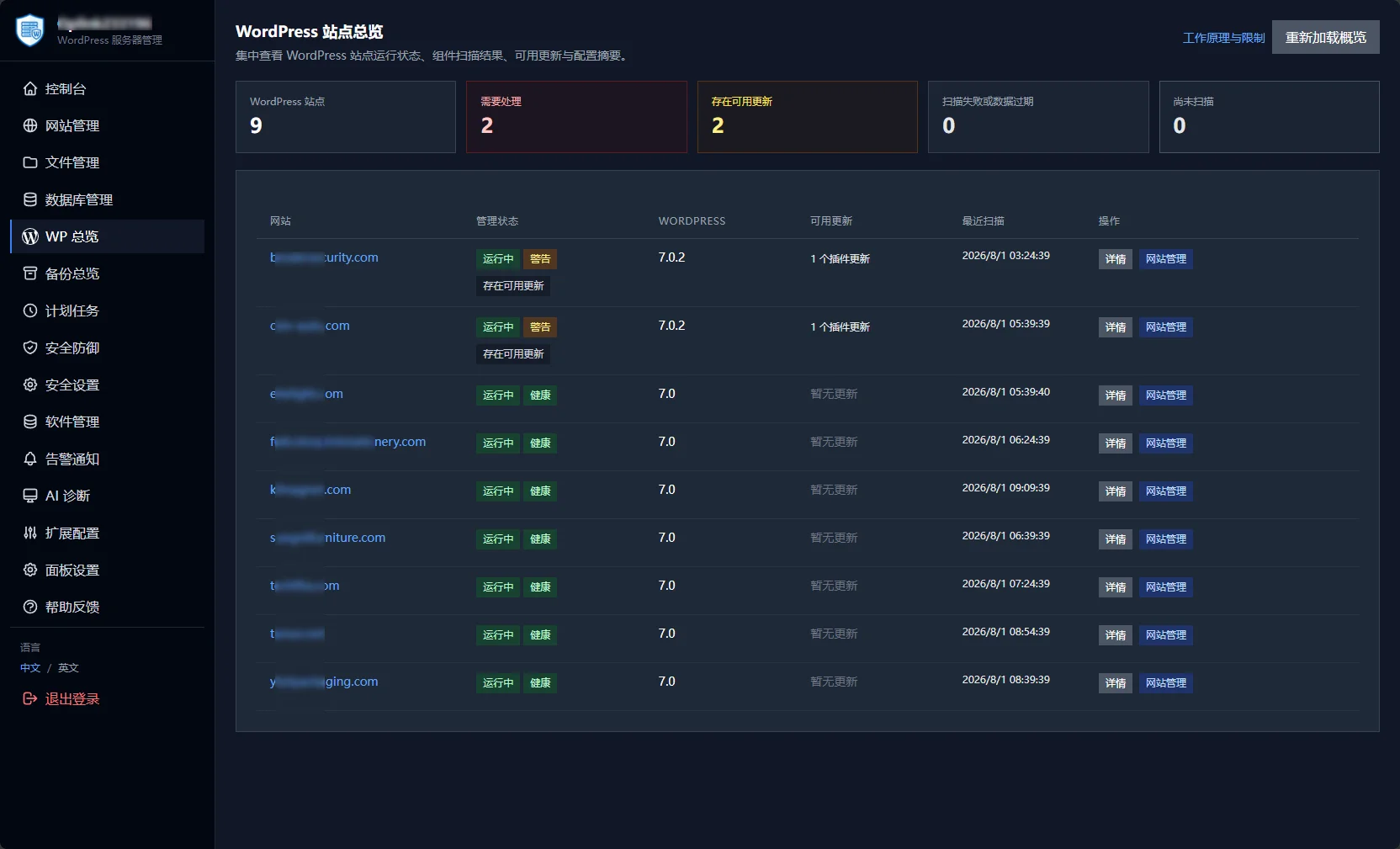
Centrally updates core, plugins, and themes, with automatic backup before updates, maintenance mode, health checks, and rollback on failure. Plugins support multi-select batch updates.
Aggregates WordPress, PHP, database, service status, and log clues to analyze site anomalies with one click. Supports follow-up questions and retains diagnostic records.
Automatically creates a Swap safety buffer, monitors OOM and core service anomalies, and records incident snapshots. Supports SMTP email and Webhook alerts.
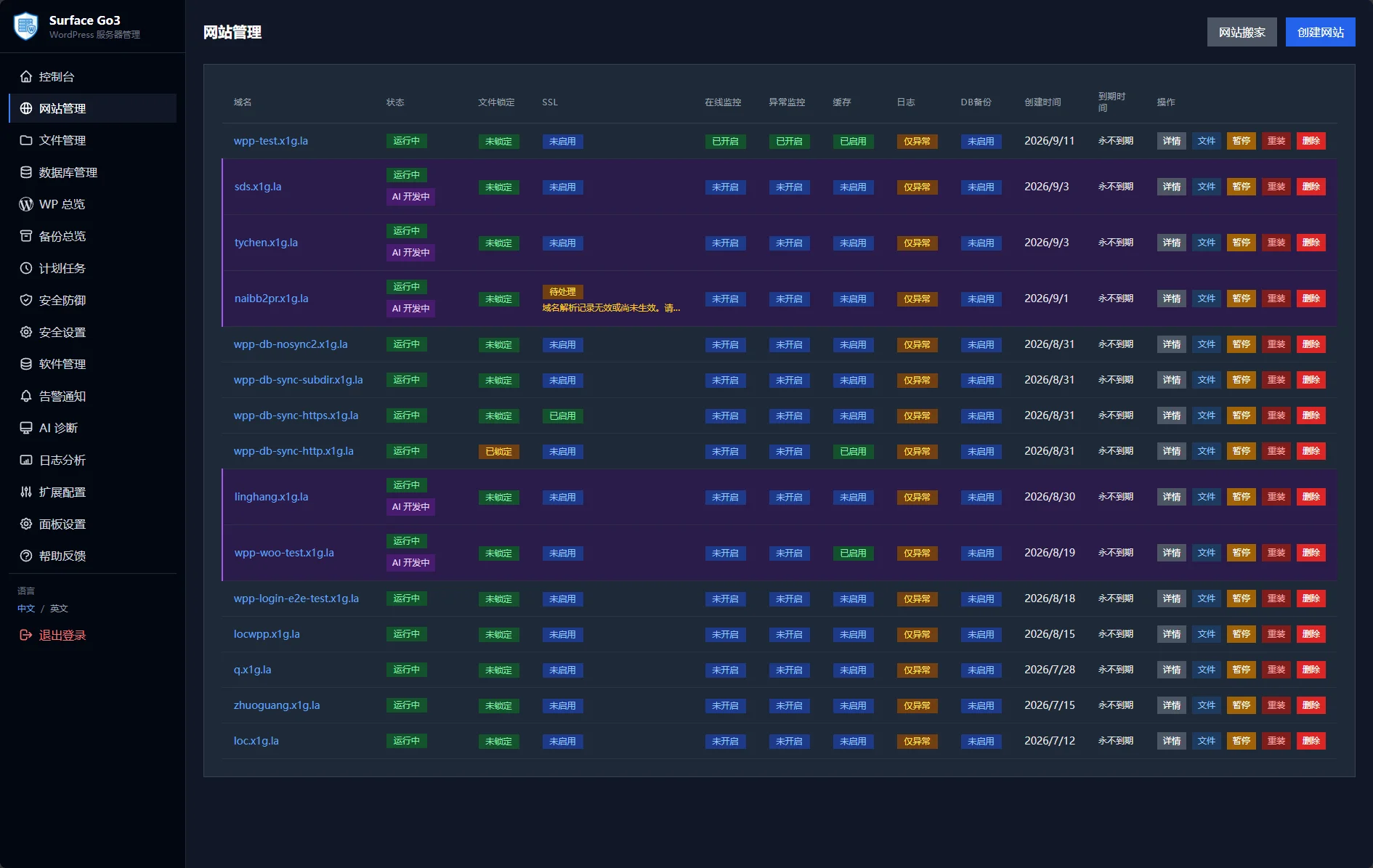
Creating a new WordPress or PHP site requires only entering a domain. The system automatically creates an isolated user, independent database, PHP-FPM Pool, and Nginx configuration, with automatic rollback on failure—tested to take only 6 steps from opening the panel to the site being accessible.
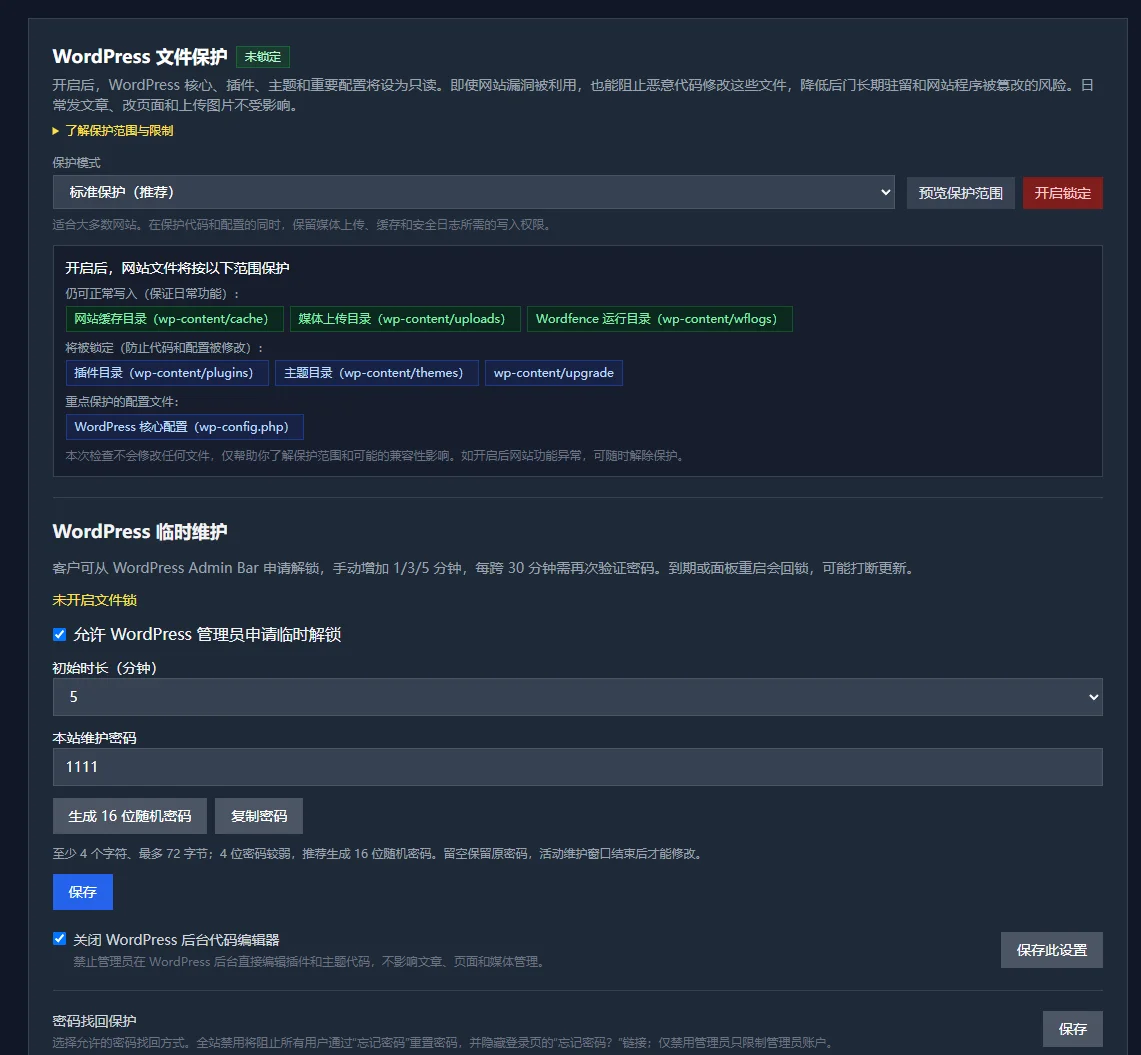
Lock core code to read-only with one click, so attackers cannot modify files even if they breach login; hourly anomaly monitoring establishes a baseline for site content, alerting immediately to any tampering. Combined with four-tier progressive banning and panel scan defense, protection is in place from the network layer to the file layer.
Centrally view the running status, core version, component scan results, and available updates of all WordPress sites, quickly identifying websites that truly need attention.
Every interception record is clearly traceable: source IP, ban level, trigger reason, and expiration time. Supports manually adding IP bans, one-click unbanning, or permanent blacklisting. Multi-tier bans range from 10 minutes to permanent, historical records are automatically purged upon expiration, and the SSH command wp unban can clear all bans with one click.
When enabled, newly uploaded JPEG/PNG images are automatically converted to WebP and compressed; the historical media library can be batch-optimized with one click. No additional plugins required, and your site's Core Web Vitals performance benefits directly.
aaPanel and 1Panel are excellent general-purpose server panels; WP Panel is purpose-built around WordPress site building, caching, security, and batch maintenance.
| Comparison Dimension | WP Panel | BT Panel | 1Panel |
|---|---|---|---|
| Resource usage | ✓Single binary approx. 20MB, software stack disk 5.7 GB | —8.0 GB, including Python runtime | —9.1 GB, requires pulling container images |
| WordPress performance | ✓No cache 28.10 QPS · Cache enabled 283.59 QPS | —No cache 2.67 QPS, no one-click cache entry point | —Not covered in this benchmark |
| Security protection | ✓Four-tier progressive banning + scan defense, ready out of the box | —Advanced protection requires third-party plugins | —Basic firewall functionality |
| WordPress-specific capabilities | ✓Caching, dual-track deployment, and wp-login protection are native capabilities | —General-purpose panel | —General-purpose panel, Docker-based approach |
| Degree of free and open source | ✓GPL-3.0, all features free | —Some advanced features require payment | —Open source (subject to official documentation) |
The comparison benchmarks are based on WP Panel v1.2.x (June 2026, the latest version at the time of testing); panels iterate frequently, so some results may have changed with new versions. For the latest conclusions, refer to the comparison review page.
In June 2026, three Vultr 1C1G servers created on the same day (New York data center, same configuration, $5/month) were installed with BT Panel, 1Panel, and WP Panel respectively, with load testing initiated from an independent fourth machine. On the same WordPress homepage: without caching, WP Panel's QPS is approximately 10.5 times that of BT Panel; with the built-in FastCGI cache enabled, it reaches 283.59 req/s, whereas BT Panel has no one-click entry to enable Nginx caching.
View Full Comparison →Plain-language summary: On an identically configured $5/month 1C1G VPS, without caching, WP Panel already handles approximately 10.5 times the traffic of the BT Panel environment, and the advantage grows further with caching enabled.
ApacheBench · 1000 requests / 10 concurrent (2026-06). Full environment and methodology available on the comparison review page. In the no-cache scenario, some non-2xx responses from WP Panel are due to the default security rate limiting in effect.
Fully open source and auditable · Dual verification of update packages · Secure by default · GPL-3.0 permanently free — all information can be independently verified.
Under the GPL-3.0 license, source code is hosted on GitHub and can be reviewed by anyone at any time; no paid version, no feature restrictions.
Panel updates are verified via SHA256 + Ed25519 signatures, with automatic rollback on update failure, ensuring the server is never left in a broken state.
AI-driven development, with new features typically going from proposal to release in just a few days; changelogs and release records are fully public.
Explicitly states support only for the Debian 13 (Trixie) + PHP 8.3 stack; help center, changelog, and issue feedback channels are all available.
Only supports Debian 13 (Trixie)
If compatibility issues arise, reinstall with a clean system to troubleshoot
Minimum 1 CPU core + 1GB RAM
Auto-creates Swap if below 1GB
Single binary file
Typical runtime memory around 20-50MB
Please confirm your server OS version before installation.
WP Panel is a lightweight alternative to Baota Panel. The core differences areFeature Focus:
Simply put: If you only use WordPress or PHP to build websites, WP Panel is a lighter, faster, and more secure choice than Baota. Viewdetailed comparison articleto learn more.
1Panel and WP Panel have completely different positioning. Which one to choose depends on your needs:
If you primarily work with WordPress websites, WP Panel is a lighter and more focused choice than 1Panel. Viewdetailed comparison articleto learn more.
Complete the installation with a single command and start managing your first website.