The latest WP Panel v1.2.23 introduces the AI Diagnosis feature, targeting common high-frequency issues in WordPress operations, providing a one-stop intelligent troubleshooting experience from 「symptom identification → automatic evidence collection → structured suggestions.」 From now on, it「s no longer 」guess-based repair,「 but the panel first collects key evidence for you and then provides actionable suggestions.
Why AI Diagnosis?
WordPress failures are usually not single-point issues but a combination of signals from „logs, services, configuration, plugins, and performance metrics.“ AI Diagnosis unifies these key dimensions into one page, helping you reach conclusions faster and reducing repetitive troubleshooting time.
One-click to start, more direct diagnosis
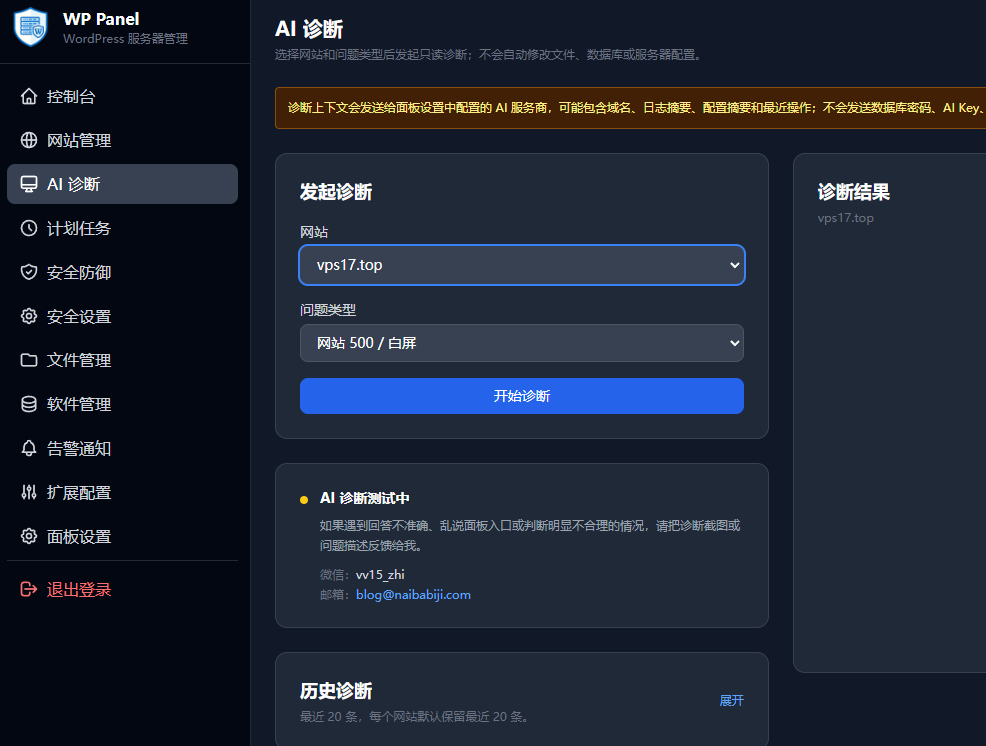
On the AI Diagnosis page, you only need to:
- Select a site
- Select a symptom (500, backend 500, SSL failure, database connection, cache anomaly, performance issue)
- Click Start Diagnosis
The system automatically collects and analyzes the site status, returning a diagnosis result including risk level, problem description, and suggested actions, supporting Markdown and clear structured display. If a complete structured result is not parsed, the original output is retained to ensure no information loss.
Automatically read which „key evidence“
AI Diagnosis does not guess; it automatically completes on-site clues based on local context, including but not limited to:
- Site basic status: domain, SSL, WordPress start/stop, cache status, webroot/log directory accessibility
- Log summaries: relevant 5xx fragments from error.log, php-error.log, wp-security.log, access.log
- wp-config security check and PHP syntax check, database information cross-validation
- Database structure and table prefix consistency check
- PHP-FPM pool, Nginx configuration, runtime service existence check
- Homepage and admin backend accessibility and key HTTP probes
- Enabled theme functions and core plugin file suspicious scan (high/medium/low priority classification)
- For performance issues, additional resource window and slow response related indicators are included
Flexible configuration, supports multiple model integration
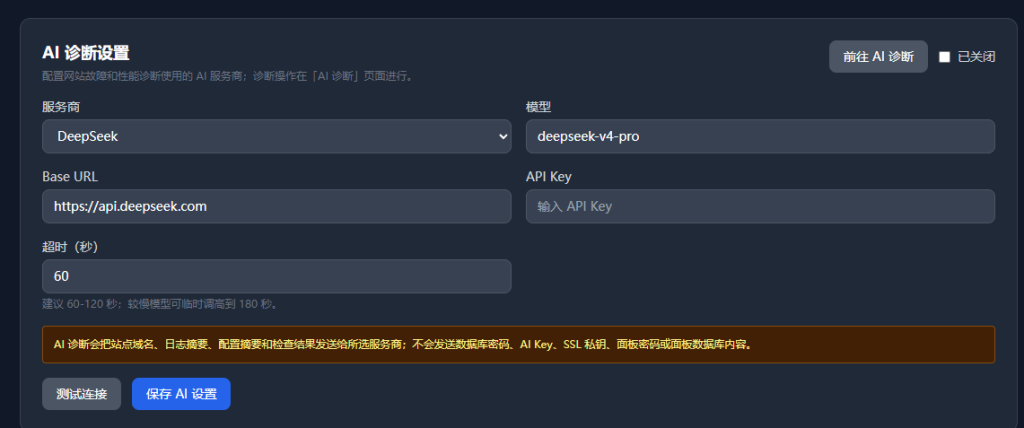
In the settings page, you can directly configure:
- Service provider: DeepSeek / OpenAI / OpenAI compatible interface
- BaseURL, Model Name, API Key, Timeout Settings
- One-click test connection and save configuration
Support session follow-up: After the initial diagnosis is complete, you can continue asking questions based on the same session without rescanning the full context, suitable for gradually exploring „why this happened.“
Reliability and Security Design: More like an operations tool, not a „chatbot“
- Read-only diagnosis: The diagnosis process does not perform write operations, and it is not recommended to execute any risky shell commands.
- Concurrency protection: Prevents overlapping diagnostic tasks for the same site, reducing resource contention.
- Session and message retention mechanism: Automatically retains history for easy traceability.
- Readable failure prompts: Error messages are uniformly converted into user-friendly explanations.
- Sensitive information masking: In sessions and prompts, database passwords, private keys, panel passwords, database content, etc., are desensitized to avoid unnecessary exposure.
Applicable Scenarios (Most Common)
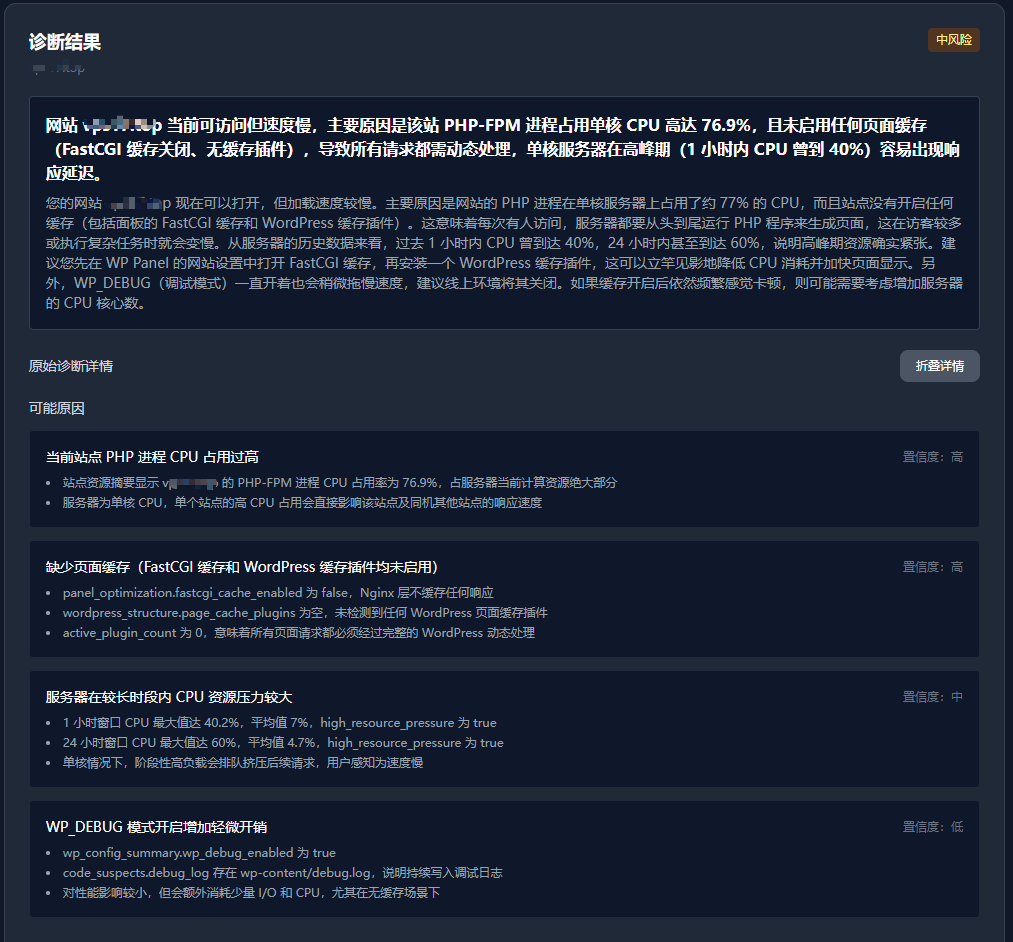
- Sudden website 500 error: Quickly distinguish between PHP errors, permissions, configuration issues, or plugin conflicts.
- SSL certificate anomaly: Quickly identify suspicious points in the link and configuration.
- DB connection slow/failure: Quickly confirm whether the database layer is misconfigured or blocked upstream/downstream.
- Cache anomaly: Determine whether abnormal behavior is caused by cache layer status/origin pull failure.
- Performance fluctuation: Provide high-probability issue clues to help you focus on bottlenecks.
Value for Operations Teams
AI diagnosis is not a replacement for human judgment, but automates the „initial screening“ and „evidence classification“ process. It is best suited for scenarios like immediate loss prevention, rapid delivery of treatment plans, and handovers in team collaboration. For administrators of small to medium-sized site clusters, this is a significant improvement, compressing fault localization from „prolonged guessing“ to „explainable conclusions in minutes.“