How many times is your WordPress site scanned daily? WP Panel's new feature helps you identify suspicious access
As a WordPress site owner, have you encountered these headaches: server CPU suddenly spikes, logs show a large number of requests targetingwp-admin/admin-ajax.php 或 xmlrpc.php; frequent „Primary script unknown“ errors during security scans, but unsure if it„s normal crawlers or malicious scans; security log files growing larger, yet difficult to quickly locate high-risk behavior? The root cause of these issues often lies in the lack of detailed analysis of site access behavior. Now, WP Panel has launched the “WordPress Site Suspicious Access Analysis„ feature in version v1.2.11, helping you precisely identify high-risk abnormal requests from massive logs and automatically generate actionable reports.
Familiar withWP Panel's multi-layer security mechanisms during runtimeusers know that this lightweight management panel has always been at the forefront of security design. This new suspicious access analysis feature is another line of defense following Nginx firewall rules, Fail2ban integration, and log whitelists. Below, we detail what practical problems this feature solves and how to use it effectively.
1. What is Suspicious Access Analysis? How Does It Work?
Simply put, WP Panel adds a set of specialized log rules at the Nginx level for WordPress sites, recording request paths that are clearly not normal pages or resource files (such as attempts to access common backdoor paths, plugin/theme sensitive files, database backup files, installation script residual directories, etc.) into a separatewp-security.logfile. Then, the panel reads and parses this log on the 「Security Defense」 page, automatically counts access times, marks risk levels (high/medium/low), and generates reproducible report text. Administrators can copy these reports and use AI tools or IP lookup services to further determine whether they are malicious crawlers or false positives.
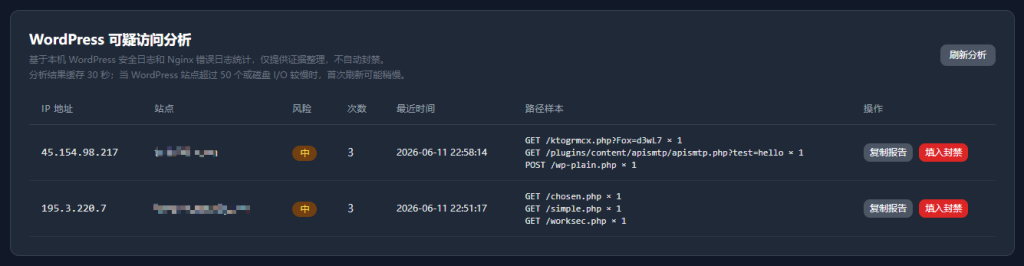
Notably, all analysis is performed on the local server,no data is uploaded to any third party, ensuring site privacy.
2. Key Improvements in v1.2.11
- Whitelist Mechanism:WP Panel allows configuring a „WordPress Security Log Path Whitelist“ in the server panel backend to exclude normal paths such as site ownership verification files (e.g., Google Search Console verification files) and Let„s Encrypt verification files. These paths will not be recorded as suspicious access. Additionally,this whitelist rule only takes effect for WordPress sites, and will not be loaded for generic PHP sites, ensuring it does not affect log rules for non-WordPress businesses.
- Nginx Template Optimization:For non-existent PHP files, WP Panel now directly returns a 404 at the Nginx level, instead of forwarding the request to PHP-FPM. This avoids the „Primary script unknown“ error in PHP-FPM error logs and resource consumption caused by mass scanning of non-existent PHP files (e.g., random path traversal). Tests show it significantly reduces unnecessary PHP process creation, freeing up server resources.
- Independent Security Log Retention:Previously, if you disabled the site's general access log (
access_log off),wp-security.logit would also be disabled. Now, the security log is retained independently. Even if you disable all general access logs to save disk space, suspicious access analysis will still record normally, ensuring security monitoring is not affected. - Nginx Rule Save Pre-check:When you save custom Nginx log rules (including whitelist configuration) in the panel, the system will first execute
nginx -tTest the correctness of the configuration. Only apply it if the test passes; if it fails, automatically roll back. This effectively prevents site-wide downtime caused by configuration errors. - 30-second memory cache:When viewing statistics on the 「Security Defense」 page, WP Panel adds a 30-second memory cache to reduce disk I/O overhead when frequently refreshing the page. This is especially effective for multi-site or slow I/O servers.
- Explicit matching for directories like Dup-Installer:Some plugins (e.g., Duplicator, UpdraftPlus) generate temporary installation directories during extraction, which are often targeted by scanning tools. The new version adds explicit Nginx matching rules for such directories to prevent false static fallback from affecting statistical accuracy.
3. How to configure and use suspicious access analysis?
The feature is enabled by default and requires no additional configuration to start recording. If you need to adjust the whitelist or view statistics, follow these steps:
- Log in to the WP Panel backend, go to the left menu 「Security Settings」 → 「WordPress Security Log Path Whitelist」, where you can enter whitelisted paths to exclude.
- Go to the left menu 「Security Defense」. At the top of the page, you can see the suspicious access statistics list, including risk level, file path, last access time, and total count. Click 「Copy Report」 to copy the current filtered statistics as text, making it easy to paste into AI tools or threat intelligence platforms for analysis.
Additionally, WP Panel has optimized log rotation configuration: when creating a new site, it automatically createsphp-error.log 和 php-slow.logrotation rules. When the panel starts, it automatically fills in missing rotations to prevent PHP error logs from not rotating for a long time and filling up the disk. Meanwhile, the panel operation log now has a retention limit of the latest 300 entries, automatically trimming to prevent the SQLite log table from growing indefinitely.
4. Comparison advantages over other panels
Compared tosimilar products like Baota Panel and 1Panel, WP Panel focuses more on WordPress scenarios in security log analysis. Unlike Baota and 1Panel, which require users to manually configure complex Nginx interception rules and fail2ban integration, and also need to configure firewall rules, WP Panel directly includes Nginx templates and log analysis engines optimized for WordPress, ready to use out of the box. More importantly, WP Panel does not support PHP version switching by default (see the official explanation for details). This small but refined approach allows it to focus more on deeply optimizing the WordPress runtime environment, avoiding security vulnerabilities caused by compatibility issues.
5. Summary
Every WordPress site is constantly being scanned and probed by the network. The suspicious access analysis feature of WP Panel v1.2.11 transforms security logs that originally required professional operations personnel to read into intuitive, actionable interfaces and reports. Whether you are an independent site owner or an operations person managing multiple client sites, this feature helps you quickly detect abnormal traffic and take action before an attack causes substantial damage.
Update your WP Panel to the latest version now(v1.2.11), log in to the backend, go to 「Security Defense」 to see how many times your site is scanned daily. To upgrade the panel, simply click update in the panel backend.
If you haven't installed WP Panel yet, just enter one installation command on a fresh Debian 13 VPS.
apt-get update && apt-get install -y wget ca-certificates && wget -qO- https://raw.githubusercontent.com/naibabiji/wp-panel/main/install.sh | bashStay vigilant, defend proactively, and keep your WordPress site running securely under the protection of WP Panel.