Why do you need to manually update WP Panel?
If your server is located in China, or the network environment has many restrictions, you often encounter issues such as connection timeout and download failure when updating WP Panel online. In this case, obtaining the compiled binary file from GitHub and manually replacing it is the most reliable method. Below I will share a verified manual update process to ensure your panel always stays up to date.
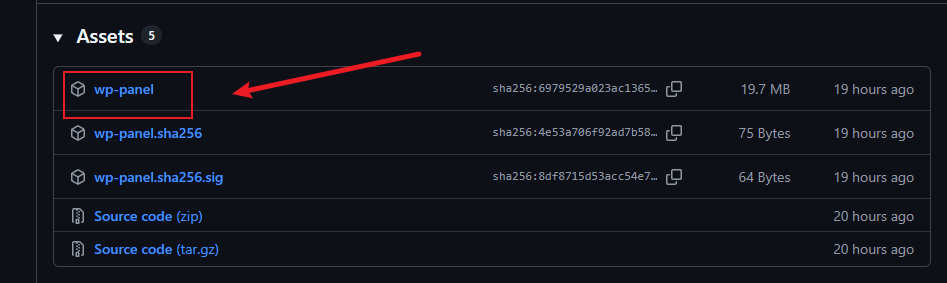
Step 1: Get the latest WP Panel binary file
Visit the WP Panel releases page on GitHub:https://github.com/naibabiji/wp-panel/releases. In the Releases list, download the executable file namedwp-panel.
Step 2: Upload and replace the old version
Upload the downloadedwp-panelfile to any temporary directory on the server (e.g.,/root). Then log in to the server via SSH and execute the following command to complete the update:
systemctl stop wp-panel && cp wp-panel /usr/local/bin/wp-panel && systemctl start wp-panel && echo "更新完成"Note: This command will first stop the panel service, then overwrite/usr/local/bin/wp-panelwith the new file, and finally restart the service. Please ensure that the directory where you execute the command is the directory where the file was uploaded. Adjust the path accordingly if there are differences.
Step 3: Verify the update status
After startup, you can verify whether the version number has been updated by checking the panel logs or accessing the backend homepage. If you encounter any startup exceptions, refer to theInstallation Script Security Transparency Reportfor permission instructions, and check whether the file owner matches the running user.
Summary and Call to Action
Manually updating WP Panel is an effective solution to network restriction issues. Just three steps: download, upload, and execute the command. If you are facing online update failures, try this process now. At the same time, keep an eye on the GitHub releases page to get security updates and feature improvements in a timely manner. Keeping your panel updated is the cornerstone of your server's security and performance.