Recently, one of our servers hosted on Linode received an official email alert "Linode Alert – inbound traffic rate", notifying that the inbound traffic rate averaged 13.08 Mb/s over the past 2 hours, exceeding the notification threshold (10). We logged into the WP Panel backend to check the site logs and found a large number of different IPs disguised as common crawlers, continuously requesting non-existent WordPress pages. These are not traditional single-IP brute force attacks, but distributed access via numerous IPv6 addresses, making it difficult for IP-based blocking rules to hit them in time.
The new „Crawler Rate Limiting“ feature in WP Panel is designed to solve this problem.
The Problem
Below is a snippet from the actual access log, with User-Agents all being meta-externalagent/1.1:
2a03:2880:f800:1a:: - - [16/Jun/2026:09:29:57 +0000] "GET /products/30829608 HTTP/2.0" 404 32601 "-" "meta-externalagent/1.1 (+https://developers.facebook.com/docs/sharing/webmasters/crawler)"
2a03:2880:f800:9:: - - [16/Jun/2026:09:30:04 +0000] "GET /products/20187920 HTTP/2.0" 404 32608 "-" "meta-externalagent/1.1 (+https://developers.facebook.com/docs/sharing/webmasters/crawler)"
2a03:2880:f800:23:: - - [16/Jun/2026:09:30:07 +0000] "GET /products/30047886 HTTP/2.0" 404 32604 "-" "meta-externalagent/1.1 (+https://developers.facebook.com/docs/sharing/webmasters/crawler)"
These requests have several characteristics:
- A large number of IPs, mainly from different IPv6 addresses.
- Request paths mostly point to non-existent product pages, random pages, or non-existent sitemaps.
- WordPress generates dynamic 404 pages, and each request still consumes PHP, database, and theme/plugin execution resources.
- A single IP may not be frequent enough to immediately trigger traditional Fail2ban IP blocking.
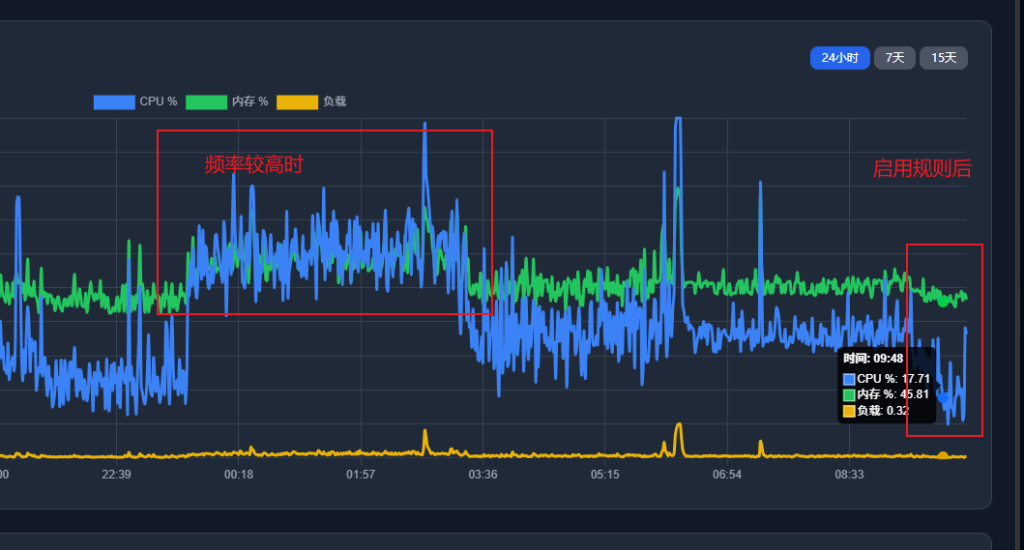
Before enabling the rule, the resource history trend on the panel homepage showed that the server CPU average usage was around 40%, and could even spike to 100% in severe cases. Although these requests return 404, they are not „cost-free“ 404s; they continuously hit the WordPress dynamic processing chain.
What the New Feature Does
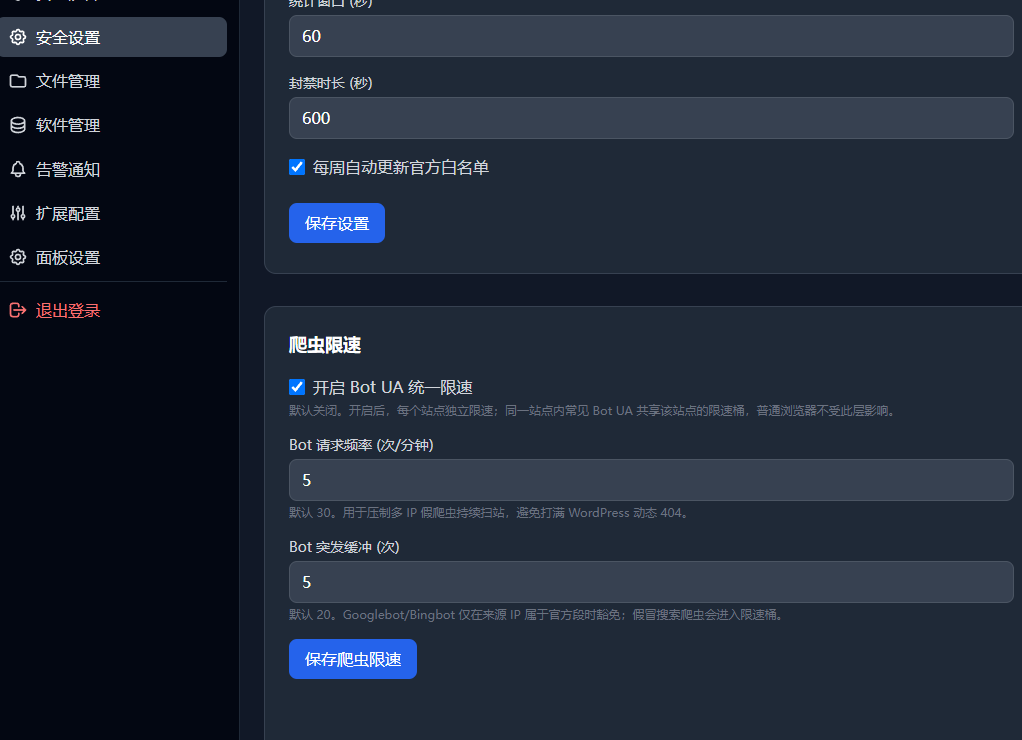
WP Panel has added a new „Crawler Rate Limiting“ security setting. It is disabled by default, and administrators can manually enable it on the „Security Settings“ page.
Once enabled, the system identifies common Bot User-Agents and establishes independent crawler rate-limiting buckets per site. Within the same site, matched Bot UAs share the site's crawler rate limit quota. This way, even if requests come from a large number of different IPs, as long as they are scanning the same site, they will be constrained by the same site-level rate limit rule.
For example:
- Site A enables crawler rate limiting at 10 requests/minute, burst 10.
- A large number of IPs disguised as
meta-externalagentscan Site A. - They cannot bypass the limit simply by changing IPs; instead, they collectively consume Site A's Bot rate limit bucket.
- Once the limit is exceeded, Nginx directly returns 429, and the request is no longer passed to WordPress for dynamic processing.
This is complementary to traditional IP-based blocking. Fail2ban will continue to count abnormal behaviors such as 429 and 404, and block an IP when it reaches the threshold; while crawler rate limiting solves the problem of „IPs being too scattered, making it difficult for a single IP to quickly reach the blocking threshold.“
Effect After Enabling
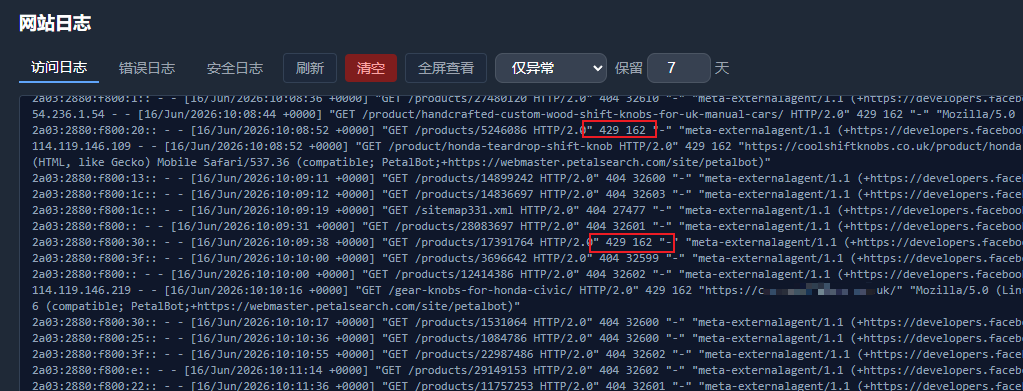
After the rule takes effect, 429 status codes start appearing in the same batch of access logs:
2a03:2880:f800:29:: - - [16/Jun/2026:09:32:45 +0000] "GET /products/6203442 HTTP/2.0" 429 162 "-" "meta-externalagent/1.1 (+https://developers.facebook.com/docs/sharing/webmasters/crawler)"
2a03:2880:f800:38:: - - [16/Jun/2026:09:32:49 +0000] "GET /products/19564875 HTTP/2.0" 429 162 "-" "meta-externalagent/1.1 (+https://developers.facebook.com/docs/sharing/webmasters/crawler)"
2a03:2880:f800:3e:: - - [16/Jun/2026:09:32:51 +0000] "GET /products/19045608 HTTP/2.0" 429 162 "-" "meta-externalagent/1.1 (+https://developers.facebook.com/docs/sharing/webmasters/crawler)"
There is a clear change in this set of logs:
- The response body of a 404 dynamic page is approximately 32KB.
- The response body of a 429 rate-limited response is only 162B.
- 429 is returned directly by Nginx at the frontend layer, and the request does not reach WordPress.
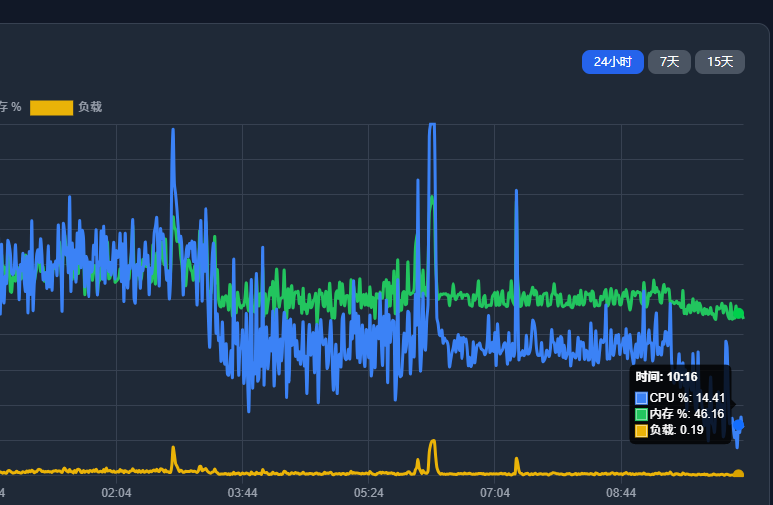
In this online test, due to the large number of attack source IPs, not every IP could quickly trigger Fail2ban's blocking threshold; however, crawler rate limiting has already smoothed traffic at the site level. After the rule took effect, CPU usage dropped from an average of about 40% to around 30%, significantly relieving server pressure.
Will It Affect Normal User Access?
It does not affect normal browser access.
Crawler rate limiting only applies to requests that match Bot UA rules. The User-Agent of normal browser users will not enter this rate limiting layer. Regular visitors still access the site according to normal rules.
Additionally, this feature takes effect independently per site. When there are multiple sites on a server, each site has its own crawler rate limiting bucket, and they do not share a total quota.
Will It Affect Google and Bing Crawling?
WP Panel provides additional protection for search engines.
Googlebot and Bingbot are not identified solely by User-Agent. The system periodically fetches the official IP ranges of Googlebot and Bingbot and verifies the source IP in Nginx. Only when the source IP matches the official IP range will it be exempt from crawler rate limiting.
This means:
- Real Googlebot / Bingbot: When the source IP belongs to the official range, it is not affected by the new crawler rate limiting.
- Fake Googlebot / Bingbot: When only the UA resembles a search engine but the IP is not in the official range, it enters the crawler rate limiting bucket.
- Other common bots: For example, Meta/Facebook, Twitterbot, LinkedInBot, Slackbot, etc., will enter crawler rate limiting according to administrator settings.
The purpose of this is to avoid the problem of „bypassing protection by simply using a Googlebot UA“ while protecting normal search engine crawling as much as possible.
Which Bots Are Recognized by Default?
Currently, the following common bots are matched by default:
- Googlebot
- Bingbot
- facebookexternalhit
- meta-externalagent
- Twitterbot
- LinkedInBot
- Slackbot
- Discordbot
- TelegramBot
- SemrushBot
- AhrefsBot
- MJ12Bot
- DotBot
- Requests containing
bot、crawler、spider、scraper、scanin UA
These rules cover common search engines, social media preview crawlers, SEO tool scanners, and general crawler characteristics.
Recommended Settings
Crawler rate limiting is disabled by default and requires manual activation by the administrator.
Default recommended values are:
- Bot request rate: 30 requests/minute
- Bot burst buffer: 20 requests
If the site is currently under obvious scanning, you can temporarily lower the values, e.g., 10 requests/minute with a burst of 10. This setting will trigger 429 faster, significantly reducing the pressure of dynamic 404s on WordPress.
If the site relies on frequent social platform preview fetching, or needs quick preview refresh after page updates, start with the default values and observe; it is not recommended to set them too low initially.
How to Verify the Rule Is Active
The simplest way to check is to view the site logs. If you see the same type of Bot requests returning 429, it means the rate limiting is active. Subsequently, if the same IP continues to trigger 429 within the statistics window, Fail2ban will continue to process according to the blocking rules.
Summary
This new crawler rate limiting is not meant to block all bots, nor to replace Fail2ban, but to address a scenario that was previously easy to bypass: a large number of IPs masquerading as common crawlers to continuously scan the site.
Its core value is:
- Intercept excessive Bot requests at the Nginx layer in advance.
- Reduce invalid dynamic 404 requests hitting WordPress.
- Perform site-level peak shaving for crawler scans that frequently change IPs.
- Reserve official IP exemptions for Googlebot/Bingbot to minimize impact on normal search engine crawling.
- Continue to work with Fail2ban to block repeated offending IPs.
For sites currently under similar scanning, this feature serves as a low-cost, rollbackable, and disabled-by-default protection switch. Without affecting normal visitor access, it helps the server allocate resources to real users.